

Showing posts with label Tutorials. Show all posts
Showing posts with label Tutorials. Show all posts
SEO Has Changed; Learn how to Create SEO Friendly Sites
How to Submit Your Blogger Sitemap to Google

For google all you need do is to make a one-time submission based on the number of posts you have. Just like I said in the previous post, sitemaps are one of the factors for getting your blog high up in the SERPs.
Take Control of your Computer with the God Mode Feature on Windows

Have you ever tried to make use of a specific Windows system tool but do not know where to find it?
Have you ever felt like being in total control over your PC and not having to run to the computer geeks in order to fine tune or modify your PC to your taste?
Run Virus Infected Programs or visit any untrusted site using Sandboxie
If you are a Windows operating system user then you will definitely come across virus infected programs from time to time. You will come across them more often if you make lots of downloads and also if you like to try out new programs(epecially the free ones).
You would also come across them if you have to crack a program using keygen or patches which are widely available on the internet.
I download programs a lot and I also like to try out and discover new and rare programs. Many times, I also have to get the crack of some program because I don't want to buy the product serial key/activation key ;-)
You would also come across them if you have to crack a program using keygen or patches which are widely available on the internet.
I download programs a lot and I also like to try out and discover new and rare programs. Many times, I also have to get the crack of some program because I don't want to buy the product serial key/activation key ;-)
How to Manually Hunt Down and Disable Virus/malware from Your USB Flash Drive

I'm never scared of putting my flash drive in any PC because I know how to see if my flash drive has caught a virus and I also know how to easily remove the virus.
There are different kinds of viruses. I don't know much about them but I know of the following types:
How to use Your Phone to Connect to the Internet Via Bluetooth Without using Nokia PC Suite


It is no longer news that you can use your phone to connect to the internet either through Bluetooth or your phone's data cable.
For years now, I have always used my phone to connect to the internet and I love using it because for me it is very convenient. All I get to do is power on the Bluetooth on both devices and with a couple clicks I'm connected.
Aero Shake: How It Works and How to Disable It
The Aero Shake is a Windows 7 feature that I did not even know of in a long time. To know about what Aero Shake is, grab a window in your Windows 7 and shake it, all other windows will be minimized. That's a cool feature right?
It's very useful while you are multitasking. You have a couple of windows open and it gets to a point where you need to have only one window active; you can put the Windows Aero Shake feature to use instead of minimizing all other windows, then bringing up the one you want.
Watch this Video Demonstration
It's very useful while you are multitasking. You have a couple of windows open and it gets to a point where you need to have only one window active; you can put the Windows Aero Shake feature to use instead of minimizing all other windows, then bringing up the one you want.
Watch this Video Demonstration
Display Google Adsense Ads on Your Blogger Blog With Mobstac

Mobstac helps in rendering your site in a very mobile-friendly form and the good part is that you can integrate your Google Adsense Ads into your mobstac powered mobile blog.
Disable The New Facebook Chat Bar, Get The Old One Back

The new Facebook chat bar is a good development from Facebook but it can be annoying at times.
Personally, I feel that it should have the option for collapsing it. I'm sure there are many other Facebook users out there who also feel the same way.
Blog Ping Services
If you own a blog, you should ping your blog regularly to tell the Search Engines that your blog has been updated. By doing this you are inviting them to crawl your blog and update your listing in the Search Engines.
Below is a list of good services which I also use
Google Blog Search Ping
Pingler
Below is a list of good services which I also use
Google Blog Search Ping
Pingler
Having Trouble Inserting Adsense code in Blogger Post? An alternative to Inserting Adsense in Blogger Posts
I actually ran into problems inserting Adsense code and getting it to work on my posts on Blogger. I was trying to do it the popular and common way but that did not work for me so I decided to think outside the box and I was eventually successful at getting it to work for me. Read on to see how I did it.
How to display Adsense code in your Blogger posts:

How to display Adsense code in your Blogger posts:
- Log in to your Blogger account

- Click on Design and then Edit HTML
Disqus Comment Box: How to Replace Blogger's comment box with Disqus
Blogger comes with a good comment box by default and it's okay but you can also get a better performance and functionality from other third party integration such as the one offered by Disqus.

Disqus offers the following features:

- Realtime comment system
- Notification and reply system
Optimize Your Blogger Blog: Improve your title tag for better search results
By default, blogger templates are not optimized for good search engine results on the major search engines. In order to be relevant on the internet you need to be visible on the search engines and one important thing they look out for is your title tag.
Every blog or website needs traffic or else what is your website there for? you may write good content or make your blog look really good but you also need to make the big guns of the internet have a unique title tag to your blog.
Every blog or website needs traffic or else what is your website there for? you may write good content or make your blog look really good but you also need to make the big guns of the internet have a unique title tag to your blog.
How to Download youTube Videos without using any software

YouTube is one of the most popular websites in the world and if you browse the internet once in a while or often you will definitely need to watch some videos on YouTube. Sometimes you feel like having a copy of a favorite video of yours on YouTube and I'm sure some people are aware that you can download the videos using some software and some people don't even know you can do that.
My Secret way of downloading from any website

This is about using an advanced search term in google to download softwares, music or any file.
Searching for information in Google is not only about typing in keywords.
There are also advanced search strings that can get you advanced results like the one I'm giving our now. I have used this to get many softwares out there that are supposed to be for sale. One cool thing about this where for-sale softwares are concerned is that I discovered that most of these softwares are overpriced.
Without further ado
A quick look into Google Earth
Google earth is a software by Google for exploring your environment or wherever you wish in real time. With Google Earth you can:

Street View
You can fly from outer space down to the streets with the new Street View in Google Earth 6. Street View has been seamlessly integrated with our 3D environment, so you can experience the streets like never before. In this video you will learn how to navigate in Street View and toggle to ground-level view.
Moon in Google Earth
DOWNLOAD GOOGLE EARTH HERE
Subscribe via RSS or Subscribe by Email.
Like TechBase on Facebook

- Fly to any place around the world.
- See 3D buildings, imagery, and terrain.
- Find cities, places, and local businesses.
Street View
You can fly from outer space down to the streets with the new Street View in Google Earth 6. Street View has been seamlessly integrated with our 3D environment, so you can experience the streets like never before. In this video you will learn how to navigate in Street View and toggle to ground-level view.
3D Trees
With version 6, you can explore 3D trees in several locations around the world. In the video below you learn how to view trees in 3D and you also get examples of places you can explore.
Historical Imagery
Travel back in time with Historical Imagery in Google Earth.
Navigation
With Google Earth, you can zoom in and explore any location on earth. The video below shows you how to navigate this 3-dimensional, virtual globe with tools such as the zoom slider, sun icon, look joystick, and more.
Searching for Places
Google Earth is an interactive, virtual globe that enables you to find and explore just about any location on our planet and beyond.
Find businesses and locations in the Search Panel and save locations in My Places Panel.
Find businesses and locations in the Search Panel and save locations in My Places Panel.
Drawing and Measuring
With Google Earth, you can trace and measure just about any place on the planet. In this beginner tutorial, you will learn how to use tools such as Ruler, Polygon, Path, Measurements, Elevation Profile and more.
Placemarks and Tours
With Google Earth’s virtual globe, you can label any location and create tours from your placemarks. Watch this video to learn how to create a custom placemark, save in Places Panel, organize placemarks, play an animated tour of placemarks and find tours in the Earth Gallery.
Exploring Mars, Moon and Sky
With Google Earth, you can fly to the ends of the earth, and beyond. Learn how to explore other planets right in Google Earth.
Moon in Google Earth
Learn how to explore Moon in Google Earth and see Moon related content such as apollo missions, 3D models of spacecrafts, landing sites and narrated tours.
DOWNLOAD GOOGLE EARTH HERE
Subscribe via RSS or Subscribe by Email.
Like TechBase on Facebook
How To configure Your Browser for Free Browsing
In configuring your PC for free browsing you have two options and the options are either to enter your settings in the system's main connection manager or to configure you browser alone.
Either of the two options has its benefits. The benefit of configuring the overall system settings is that you might be able to have your windows update functioning, your antivirus updating and you can have almost all of the internet enabled applications on your system working but then you will definitely lose bandwidth generally especially if your connection is GPRS or EDGE. I connect using 3G so I use this option and most of the time I do not experience any form of lag in the connection. But if you are connecting using EDGE you might want to configure your browser only.
Configuring Your Browser
Not all browsers can be configured on their own. Below are some of the browsers you can't configure:
Most of the time the proxy is the localhost - 127.0.0.1 so the most important thing is knowing the port number.
How to configure Mozilla Firefox

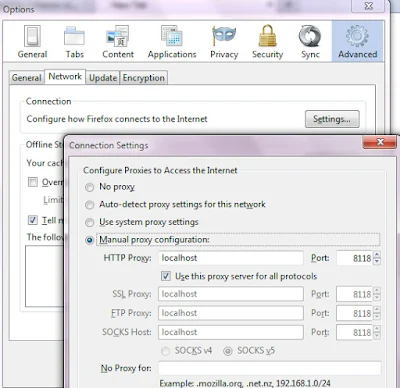
Even if you do not know which port to enter for each protocol if you know the default address(HTTP) it might just work for the others so you should just enter it then tick "Use this proxy for all protocols"
If the config for SSL is different you should give it its own seperate port number but most of the time this is what works:
HTTP Proxy: 127.0.0.1 (or localhost) Port: 8080
Enable "Use this proxy for all protocols"
How to configure Opera
To configure Opera,


Enter the desired proxy address details
You will see all the available protocols but note that Opera does not use the term SSL in its proxy server identification. Instead it uses HTTPS
You should now enter your provided SSL Address and Port number here if you need to
Configuring the whole system for Free Browsing
In order to do this click your network icon and then click Open Network and Sharing Center (Vista and & Users)
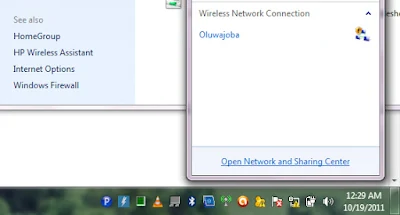
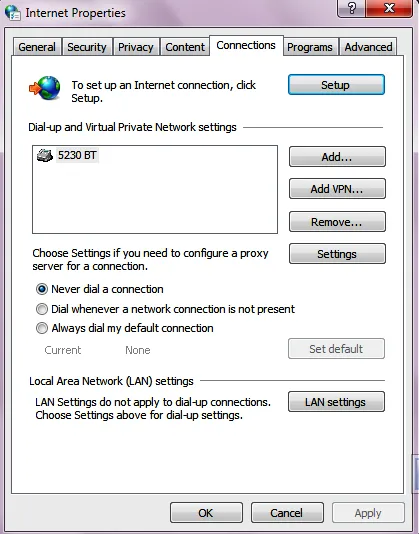
You might see several connection profiles if you connect using more than one device such as MTN 3G, GLO 3G, etc.
Determine the connection you are using and double click it to open its settings interface.
Next, tick "Use proxy server for this connection"
You can now enter your Proxy address (eg 127.0.0.1) and Port (eg 8080)
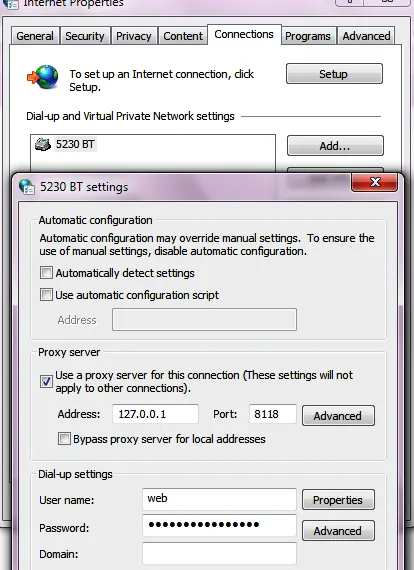
If you have a different port number for SSL/HTTPS you should click on the advanced button (this opens another window)
You can now enter a different port number for your HTTPS/SSL in the space labeled as Secure.

With this setting, you will be able to use Chrome, Safari and Internet Explorer, Maxthon, Yahoo Messanger, etc for your free browsing configurations as well as other internet enabled applications on your PC.
Note:
If you configure your Mozilla Firefox or Opera for free browsing, you need to tick/enable "No Proxy" if you are not doing free browsing or else you browser won't connect.

Subscribe via RSS or Subscribe by Email.
Like TechBase on Facebook
Either of the two options has its benefits. The benefit of configuring the overall system settings is that you might be able to have your windows update functioning, your antivirus updating and you can have almost all of the internet enabled applications on your system working but then you will definitely lose bandwidth generally especially if your connection is GPRS or EDGE. I connect using 3G so I use this option and most of the time I do not experience any form of lag in the connection. But if you are connecting using EDGE you might want to configure your browser only.
Configuring Your Browser
Not all browsers can be configured on their own. Below are some of the browsers you can't configure:
- Google Chrome
- Internet Explorer
- Safari
- Mozilla Firefox
- Opera
- Flock
Most of the time the proxy is the localhost - 127.0.0.1 so the most important thing is knowing the port number.
How to configure Mozilla Firefox
- Click on Tools on the Menu bar and go to Options
- Then Click the Advanced tab

- Next click Network tab under Advanced tab
- Next click settings under the connection tab

- You can now enter the desired settings
Even if you do not know which port to enter for each protocol if you know the default address(HTTP) it might just work for the others so you should just enter it then tick "Use this proxy for all protocols"
If the config for SSL is different you should give it its own seperate port number but most of the time this is what works:
HTTP Proxy: 127.0.0.1 (or localhost) Port: 8080
Enable "Use this proxy for all protocols"
How to configure Opera
To configure Opera,
- Click Menu >> Settings >> Preferences

- On the preferences window, go to Advanced then Click Network

- Next, click the Proxy Servers button

Enter the desired proxy address details
You will see all the available protocols but note that Opera does not use the term SSL in its proxy server identification. Instead it uses HTTPS
You should now enter your provided SSL Address and Port number here if you need to
Configuring the whole system for Free Browsing
In order to do this click your network icon and then click Open Network and Sharing Center (Vista and & Users)
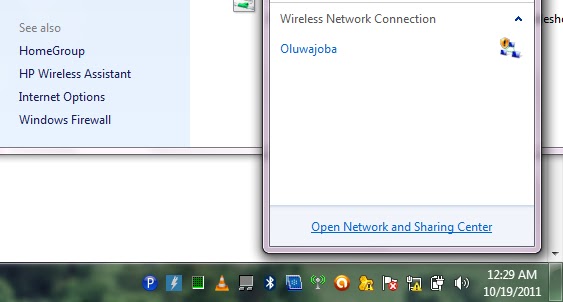
At the buttom left of the scree click internet options and then go to the connections tab
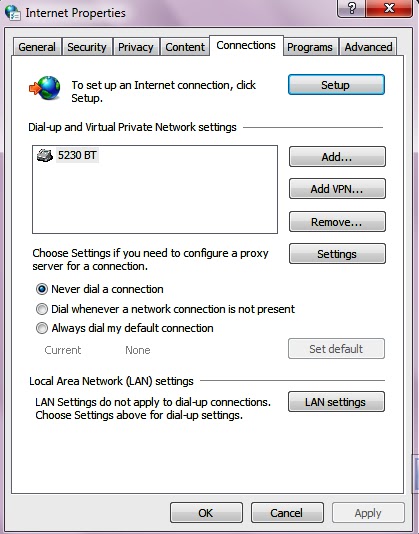
You might see several connection profiles if you connect using more than one device such as MTN 3G, GLO 3G, etc.
Determine the connection you are using and double click it to open its settings interface.
Next, tick "Use proxy server for this connection"
You can now enter your Proxy address (eg 127.0.0.1) and Port (eg 8080)
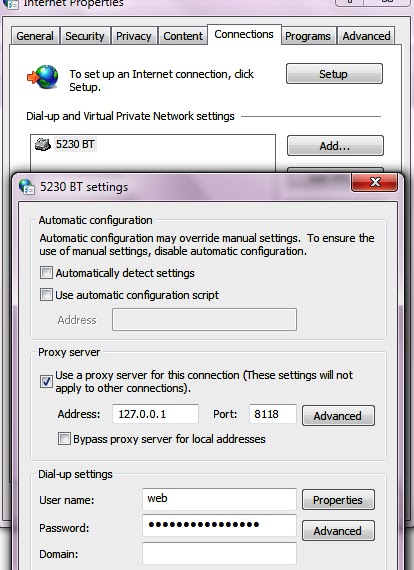
If you have a different port number for SSL/HTTPS you should click on the advanced button (this opens another window)
You can now enter a different port number for your HTTPS/SSL in the space labeled as Secure.

Note:
If you configure your Mozilla Firefox or Opera for free browsing, you need to tick/enable "No Proxy" if you are not doing free browsing or else you browser won't connect.

Subscribe via RSS or Subscribe by Email.
Like TechBase on Facebook
How to create customized Football Jersey for Facebook
Creating a Jersey for your facebook profile picture is easy. Just follow the few steps below and with a few clicks your Customized football jersey is ready.
To create the jersey,
First go to this web address
Then select your preferred team.

The next thing to do is to Select your preferred jersey theme/color

After this you can choose a skin tone that probable matches your own skin tone
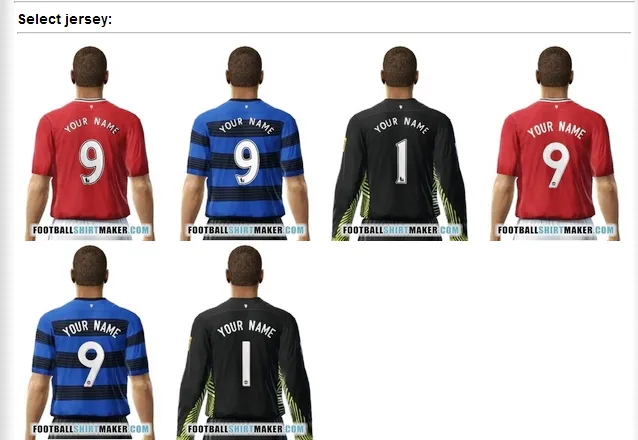
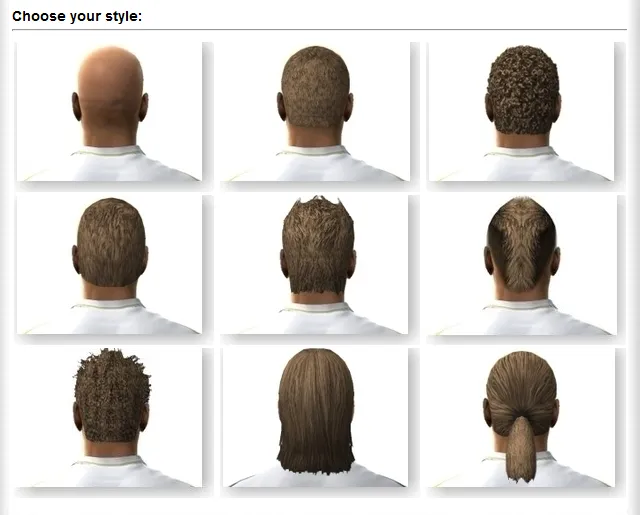
The next is hair syele and then
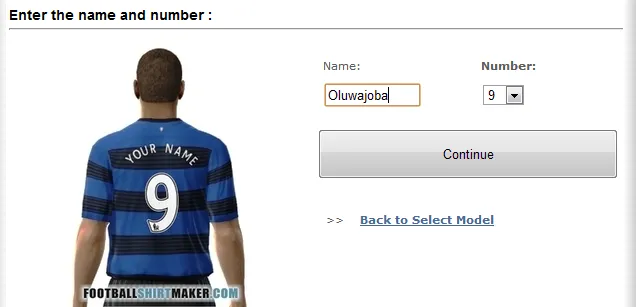
Hair color.
And that's all, your jersey is ready.
You now have the options to either save your new jersey image to your hard drive or upload it directly to your Facebook profile.

Subscribe via RSS or Subscribe by Email
Like TechBase on Facebook
To create the jersey,
First go to this web address
Then select your preferred team.

The next thing to do is to Select your preferred jersey theme/color

After this you can choose a skin tone that probable matches your own skin tone

The next is hair syele and then

Hair color.

And that's all, your jersey is ready.
You now have the options to either save your new jersey image to your hard drive or upload it directly to your Facebook profile.

Subscribe via RSS or Subscribe by Email
Like TechBase on Facebook
The Etisalat Easy Net Browsing Plans

1. EASY NET DATA BUNDLE: 24x7
- 100MB / N1000 - Dial *229*2*1# to subscribe
- 500MB / N3000 - Dial *229*2*2# to subscribe
- 3GB / N6500 - Dial *229*2*3# to subscribe
- 1.5GB / N5000 - Dial *229*2*4# to subscribe
- 6GB / N8000 - Dial *229*2*5# to subscribe
2. EASY NET TIME PLAN: 24x7
- Daily Access, 24hrs - 15MB / N100 - Dial *229*3*1# to Subscribe
- Weekly Access, 7 days - 75MB /N500 - Dial *229*3*4# to Subscribe
- Night Time(Including Weekend) Access, Mon to Thur, 8pm - 7am, Fri, 8pm - 7am Monday / N5000 / 3GB - Dial *229*3*3# to Subscribe
To check your data usage on any of the plans, dial *228#
Subscribe via RSS or Subscribe by Email.
Like TechBase on Facebook
Etisalat Introduces Another Tariff Plan: Easy Life Proposition 2.0

This plan offers you cheaper call rates than the first Easy Life. While calls are charged at 25 kobo per second on the previous package, it costs just 20 kobo per second to make calls on this new package.
Other benefits include calls at 20 kobo per second to the US and all landlines in the UK. You also get 20 Free Etisalat to Etisalat SMSs everyday.
How to subscribe:
First unsubscribe from the previous Easy Life if you already subscribed to it
by dialing *220*2#.
After then, migrate to the new package
by dialing *320*1#.
Note that Subscription costs N25 daily. To unsubscribe at any time, dial *320*2#
Subscribe via RSS or Subscribe by Email.
Like TechBase on Facebook
Subscribe to:
Posts (Atom)